Delete Your BiteCal AI Account
Follow our quick in-app guide to delete your account instantly, or submit an online data erasure request.
Delete Account via Mobile App
In-app deletion takes effect immediately and purges your food logs & photos.
Open BiteCal AI App
Launch the app on your iOS or Android phone and confirm you are signed in.
Go to Settings (⚙️)
Tap the Settings tab at the bottom right of the navigation bar.
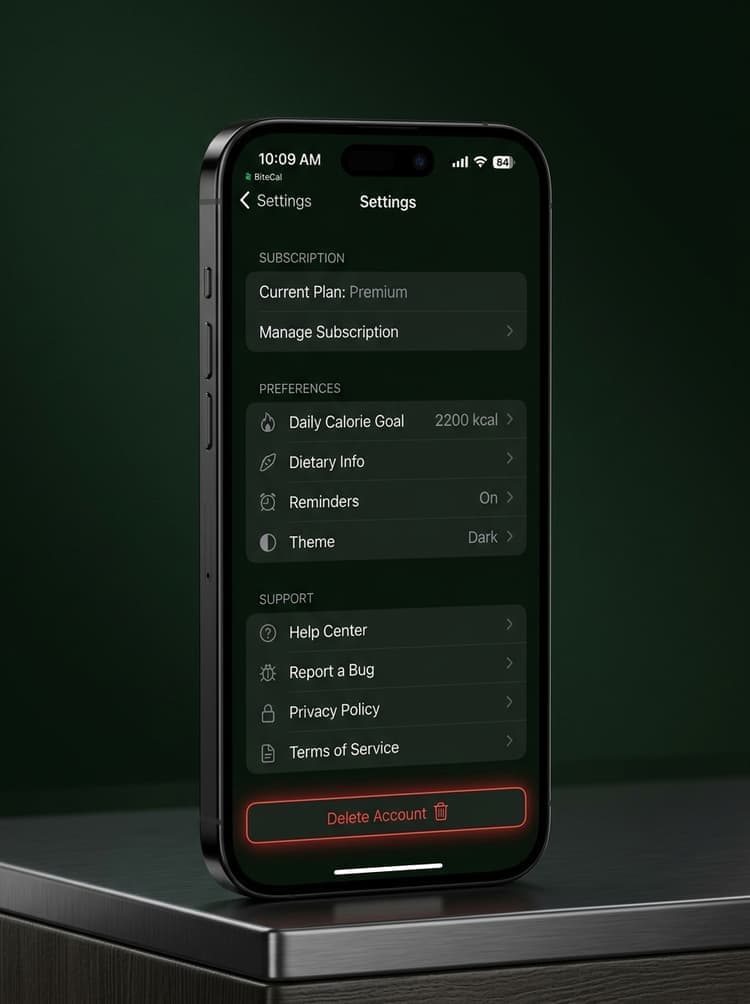
Scroll to the Bottom
Scroll past Subscription and Support until you reach the action buttons.
Tap “Delete Account”
Tap the red Delete Account button (highlighted on screen mockup) and confirm.
Data Erasure & Retention Breakdown
In compliance with Google Play Store, Apple App Store, GDPR, and CCPA standards:
- •User Identity: Name, email address, profile avatar, password.
- •Meal Photos & Scans: Uploaded food images and AI dish recognitions.
- •Nutrition History: Calorie logs, macro targets (protein, carbs, fat), weight logs.
- •Integrations: Apple Health & Google Fit sync tokens.
- •Financial Receipts: App Store / Google Play transaction IDs retained for legal & tax audits.
- •Anonymization: Retained receipts are fully detached from your personal meal history.
- •SLA Timeline: In-app deletion is instant; web requests take 24–48 hours.
Deleting your account does not cancel active app store subscriptions. Please cancel your subscription in Apple/Google store settings to avoid future billing.
Frequently Asked Questions About Account Deletion
Can I recover my BiteCal account after deletion?
No. Account deletion is permanent and non-reversible. Once completed, all food scan photos, calorie logs, and personal settings are purged permanently.
How long does deletion take?
In-app deletion via Settings takes effect instantly. Online web deletion requests are processed within 24 to 48 hours.
What happens to my data in Apple Health or Google Fit?
Deleting your BiteCal account revokes all API tokens. Data previously written to Apple Health or Google Fit remains stored safely in your personal device health storage.
Have additional privacy questions?
Contact our privacy team at support@bitecal.ai or view our official Privacy Policy.